
CRM for Educational Centers
Classberry CRM is designed to automate educational centers.
The main goal of the CRM service is to help organize order both in working with students and in the internal processes of the organization, as well as to provide the most complete and detailed reporting on every component of your educational center.
 Quick
QuickSetup
 Free
FreeTrial
Classberry CRM System - is:
A CRM system for educational centers. With this CRM, you can manage student records, track attendance, maintain schedules, process sales, and much more. Additionally, Classberry allows you to analyze the profitability of courses and instructors, and serves as a tool to fully unlock the potential of your educational center.
A complete set of tools for your educational center
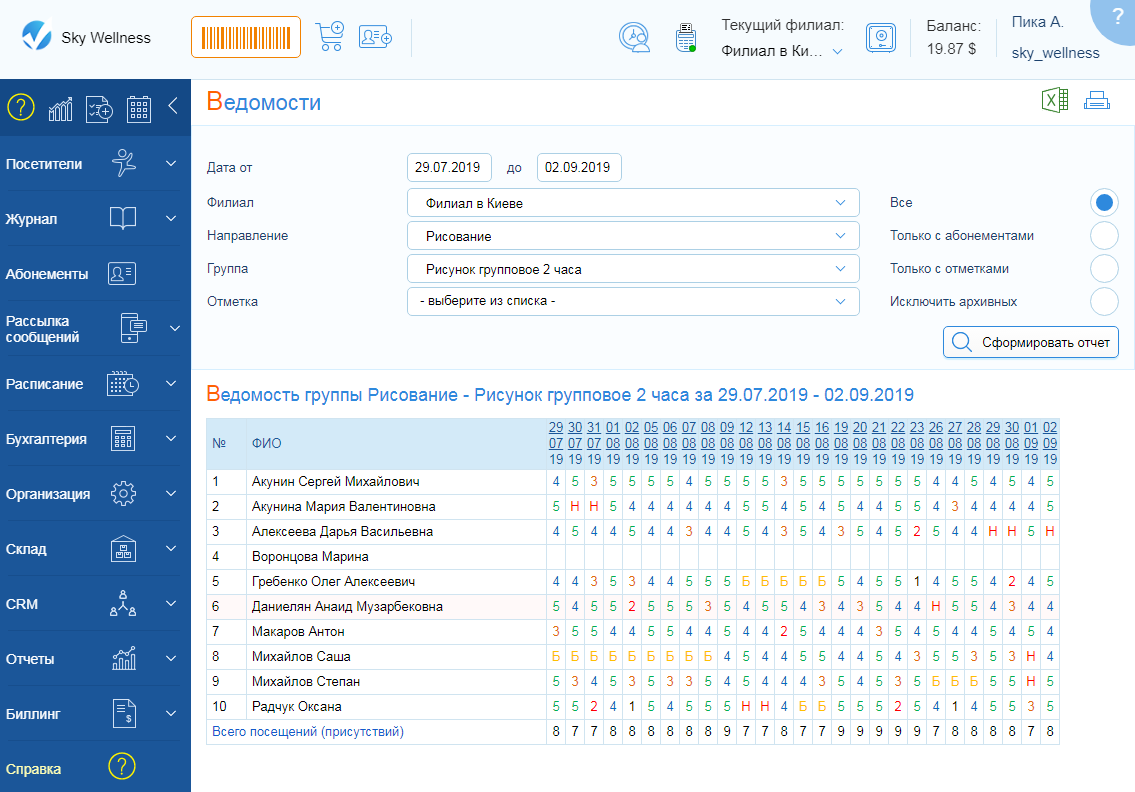
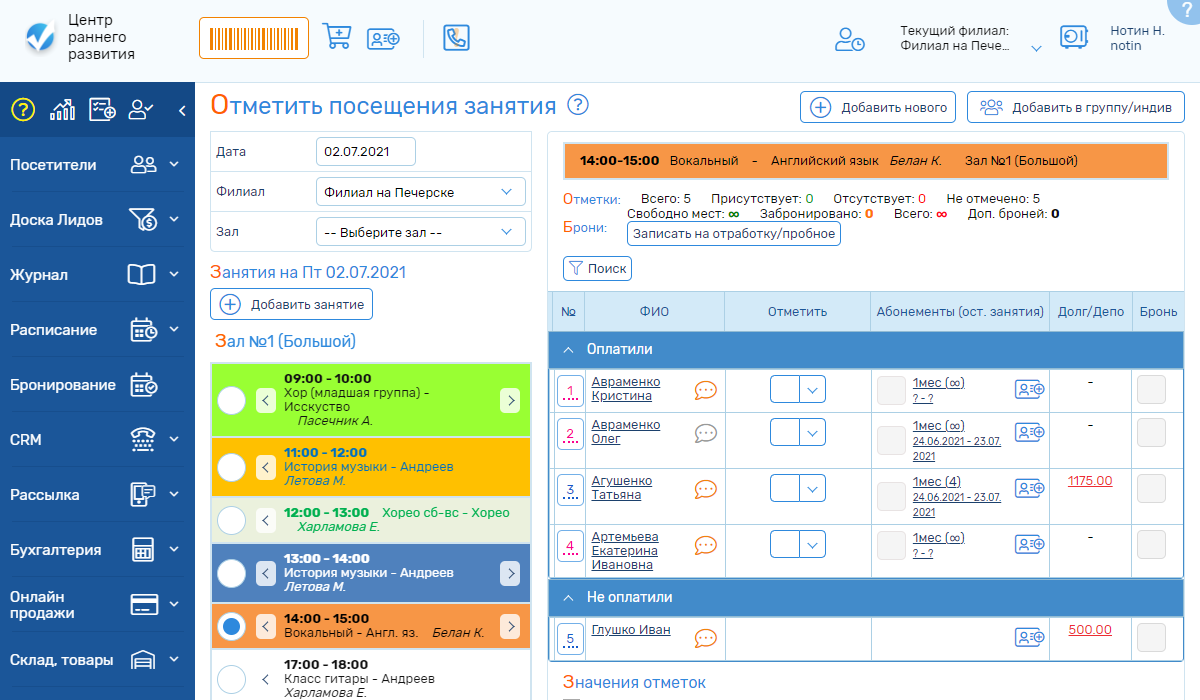
The Electronic Journal is an analog of the paper attendance journal, helping you not only quickly mark attendees in classes and edit schedules, but also perform many other related actions necessary for fast and quality customer service:
- adding clients to the system and registering them in a group;
- assigning grades;
- selling subscriptions;
- debt repayments;
- scheduling make-up sessions or pre-registering for classes;
- adding comments about the client;
- noting absence reasons next to the teacher;
- quick search and generation of client lists registered for classes, who paid or not paid;
- changing client statuses and assigning tags;
- recording other courses or directions the client is interested in;
and all this from a single page in just a few clicks.
Classberry CRM offers maximum capabilities for client management.
- Complete client history.
- Leads Board.
- Attendance records.
- Purchase history.
- Financial statements.
- Debt and deposit operations.
- Requests and communication history.
- Performance reports.
- Online homework assignments.
- Pre-registration for classes online and via administrator, and much more.
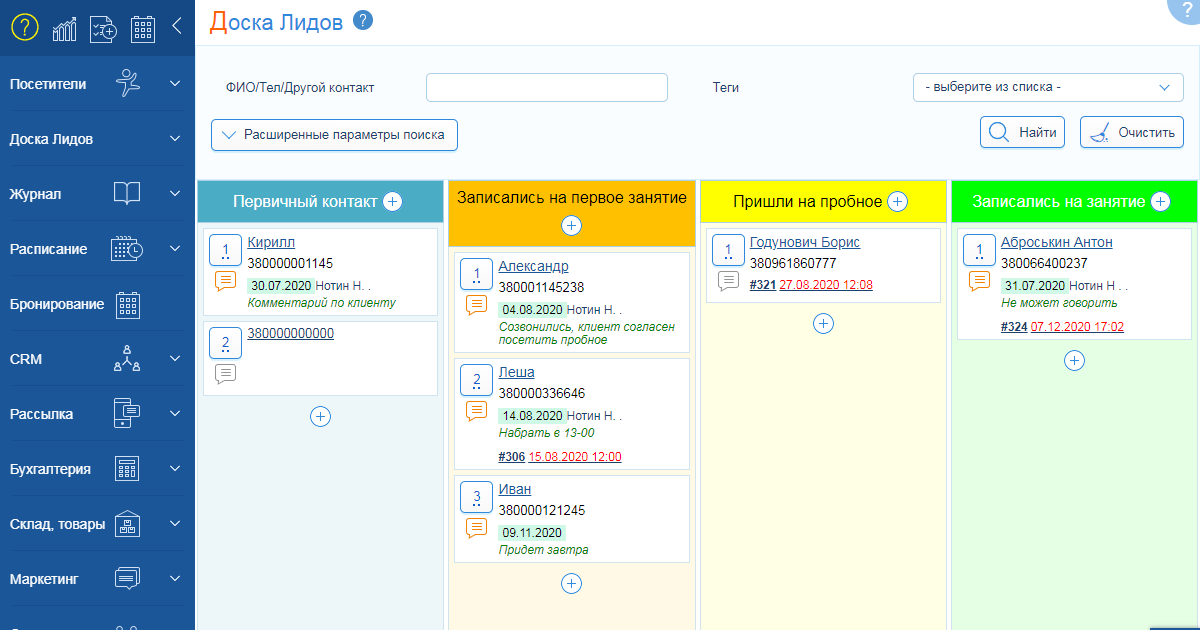
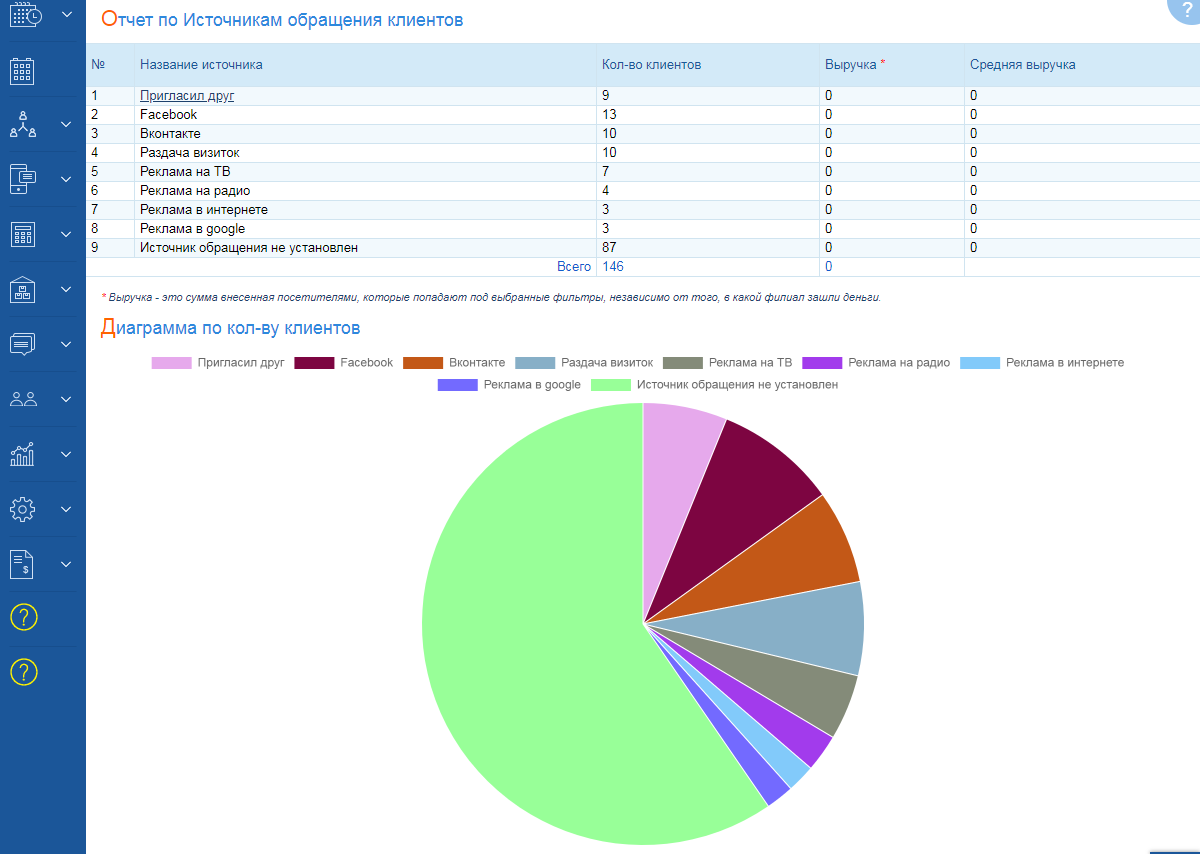
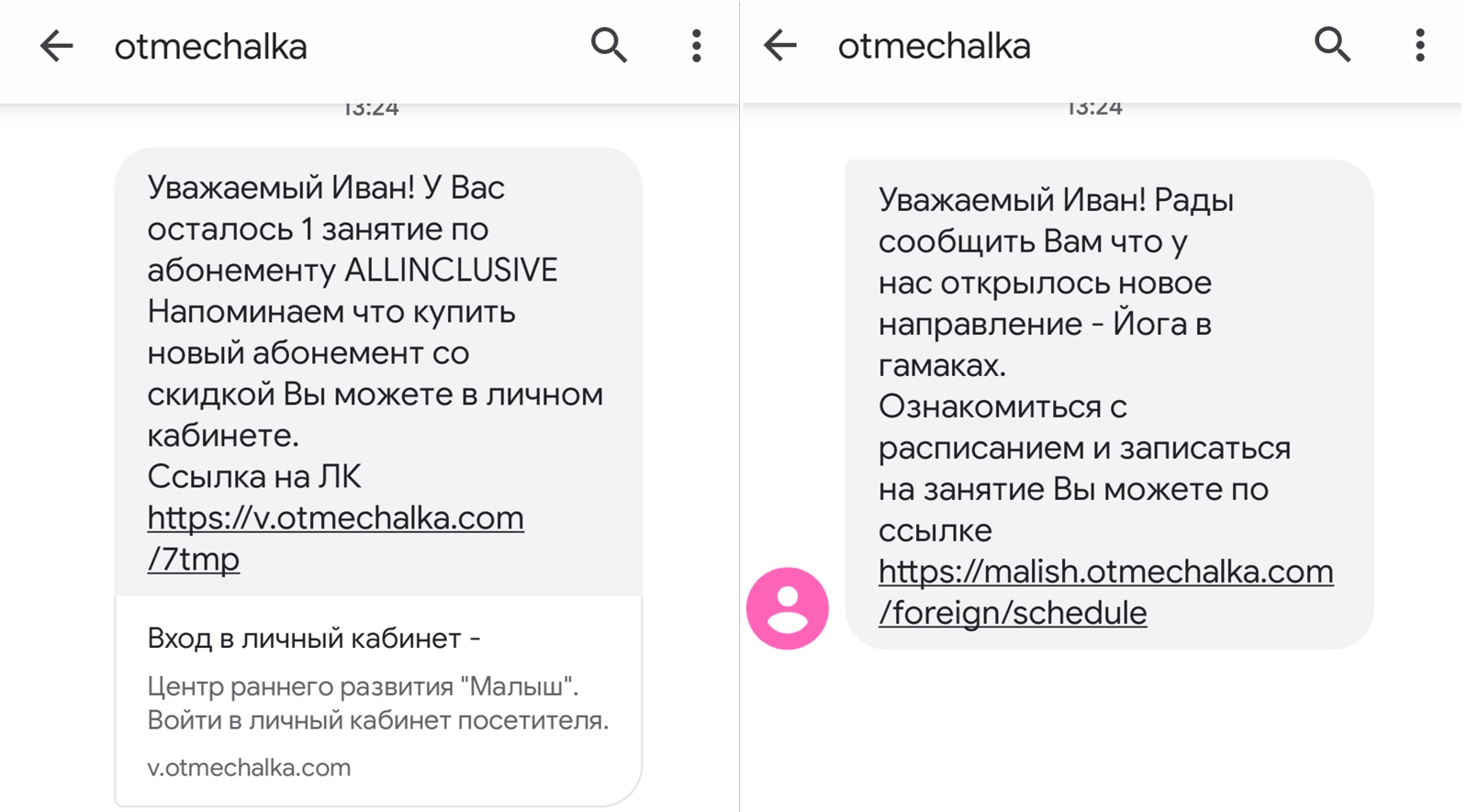
The system includes all the main marketing and lead generation tools that will allow you to convert a lead into a regular client.
- Feedback forms.
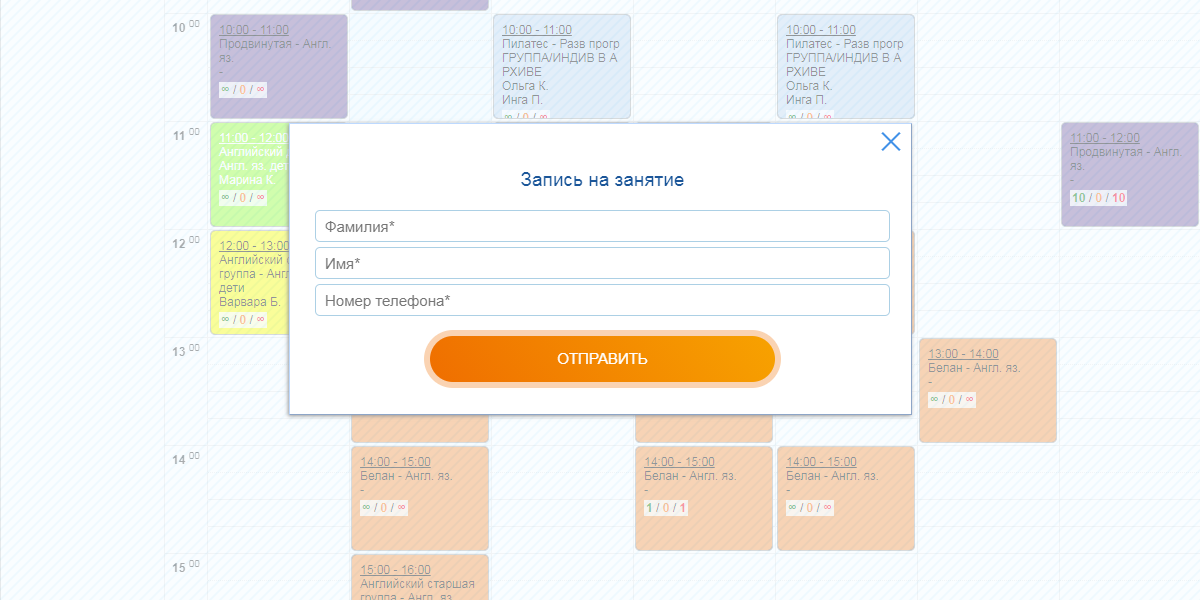
- Online booking on the website.
- Social media integrations.
- Sales funnel.
- Integration with Google Analytics.
- Statuses and tags.
- Tracking sources of inquiries and communication methods.
- Mailings (SMS, E-mail, Telegram).
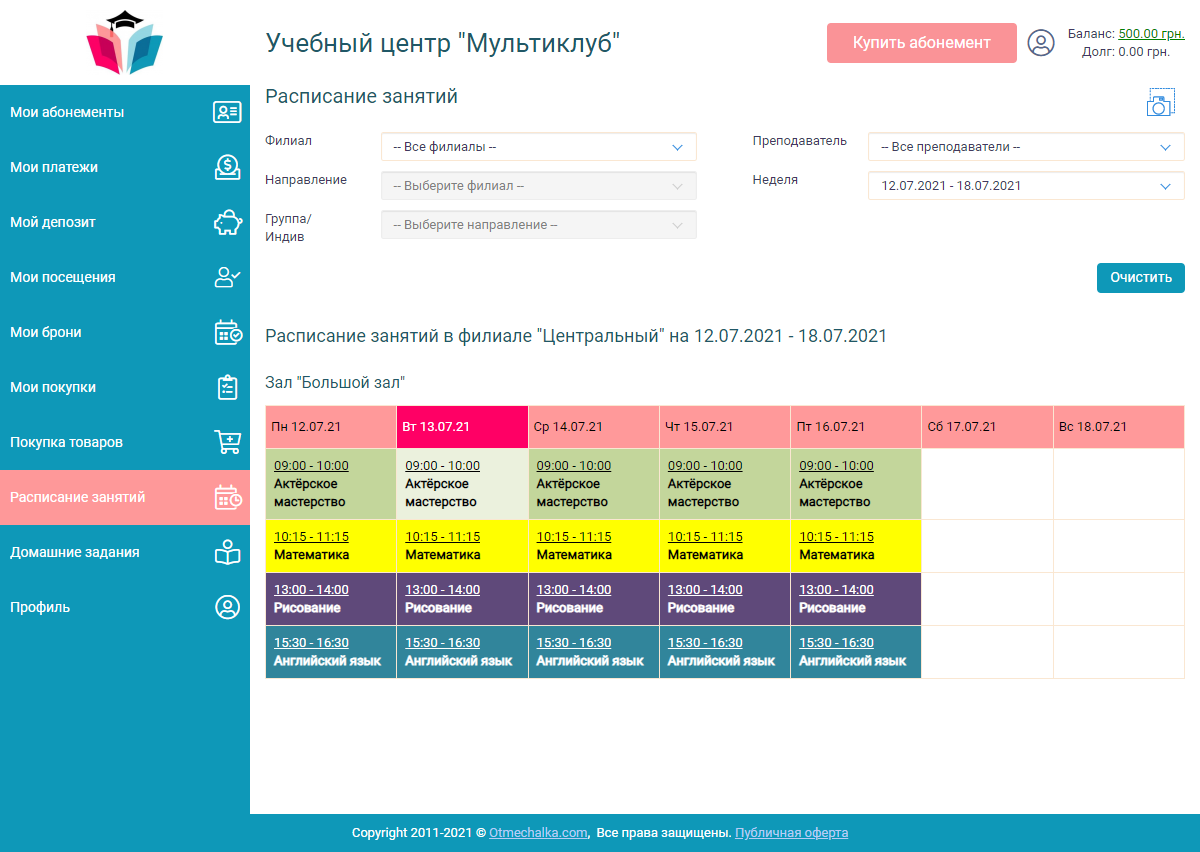
For your regular clients, a simple and clear Personal Account is provided, designed to automate many routine processes that consume a lot of your administrators’ time and introduce certain chaos in fast and quality client service.
Through the Personal Account, your clients will be able to independently:
- view all information about their subscriptions and remaining visits;
- purchase or renew a subscription by paying online using one of the convenient methods (multiple online payment methods may be available);
- settle debts without your involvement;
- buy textbooks, notebooks, and other related items online;
- receive homework assignments;
- communicate with the administrator in chat.
In turn, you can create a branded solution for your clients by customizing the Personal Account with corporate colors and placing your company logo on the top panel of the account.
With Classberry CRM, you also get the ability to:
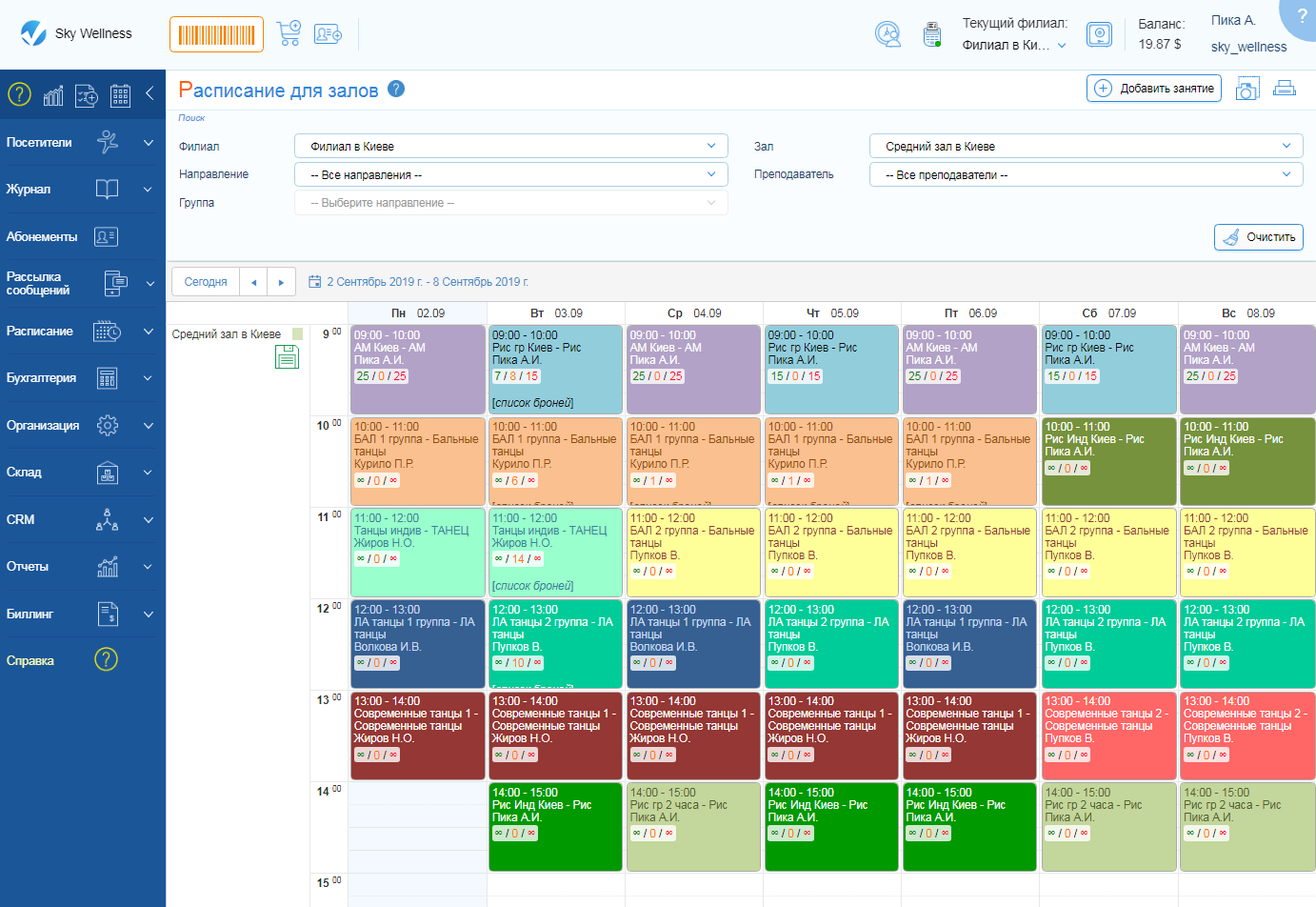
- create schedules for individual and group classes;
- develop educational courses and plan their launches;
- track topic completion;
- publish class schedules on the website and social media;
- share schedule links via messengers; manage the class schedule in a single system - now there is no need to duplicate changes across different platforms, they will update automatically immediately after saving the changes.
Do you sell textbooks, additional electronic materials, or other related products?
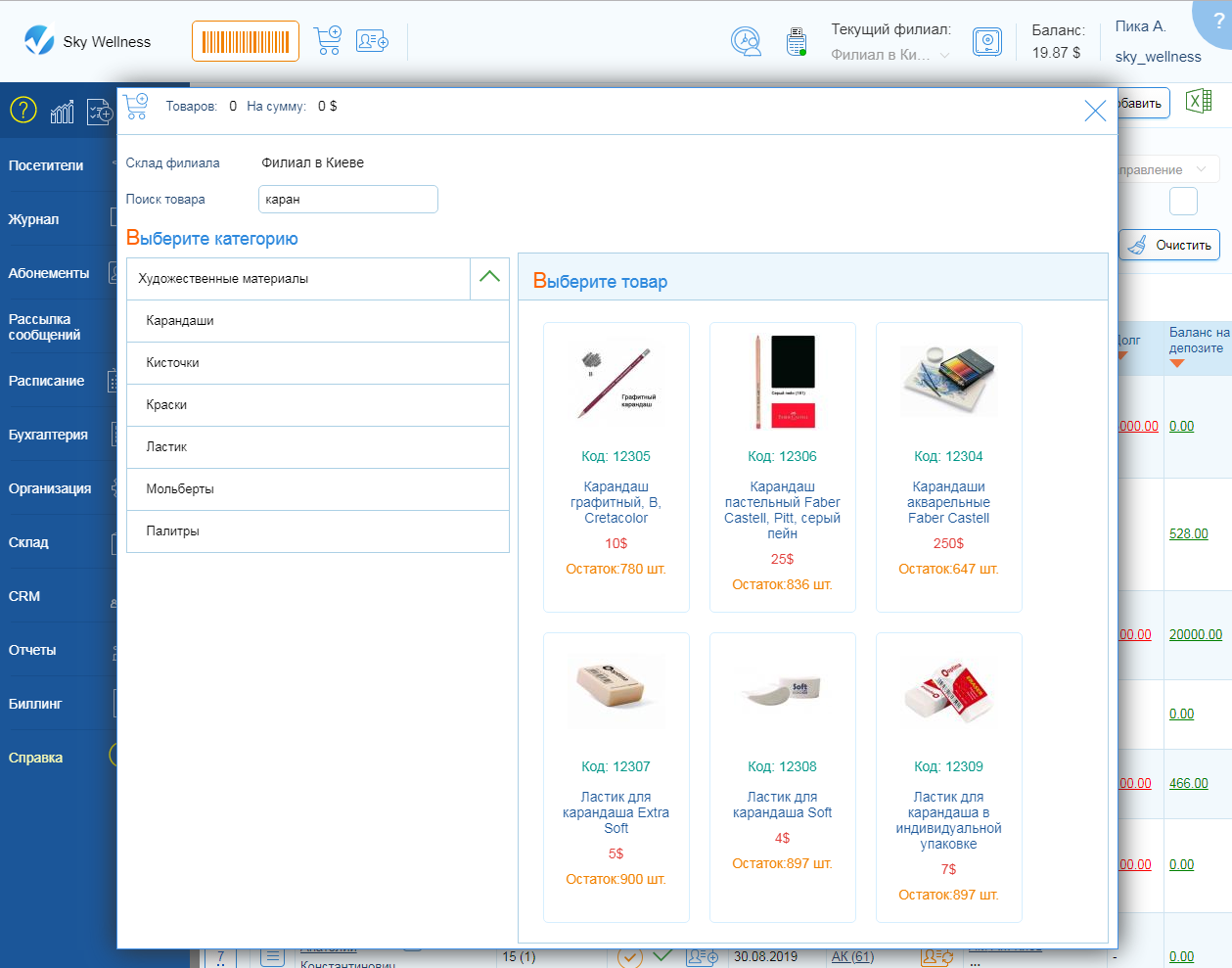
Then another useful feature of Classberry CRM for you is the sale of related products and inventory management:
- selling products online through the Personal Account and via your website with the ability to connect multiple payment systems;
- recording product sales in the system;
- tracking purchases;
- controlling product movement between branches;
- reporting on gross profit;
- online sales report;
- automatic bonus allocation to employees for product sales.

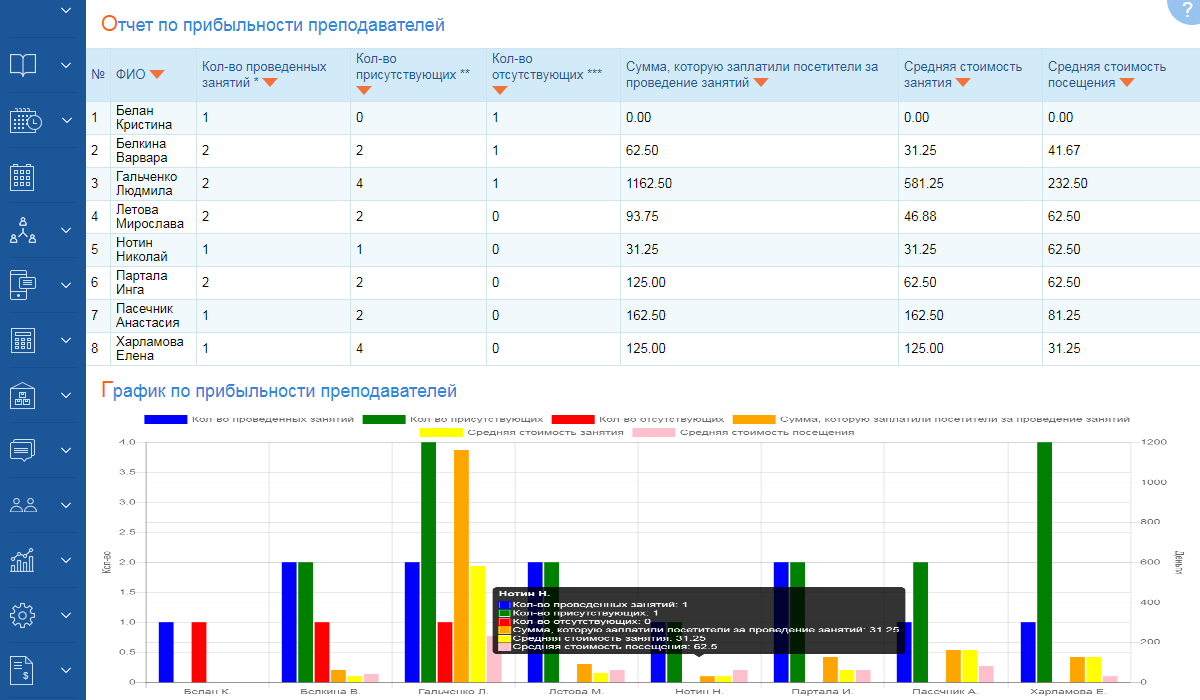
Classberry CRM includes all necessary reports, which are generated instantly based on your center's statistical data.
- Growth of client base.
- Inactive clients.
- Profit and loss report.
- Complete financial report.
- P&L report.
- Attendance list.
- Performance report.
- Report on completed and missed classes.
- Instructor profitability report.
- Active and sold subscriptions, etc.
With Classberry CRM, you get more than 50 reports in various breakdowns, developed based on many years of experience from real Educational Center managers.
With us, you will receive high-quality
service and data security guarantee
 01
01 02
02 03
03 04
04 05
05 06
06Pricing
with additional modules
active visitors
without additional modules
active visitors
without additional modules
active visitors
without additional modules
active visitors
Our Clients' Feedback
Very satisfied with the chosen service. It helps us maintain fast client accounting and subscription issuance in our center, and also guarantees reliability for our clients—they can get a printout of their attendance and payments for the entire period of cooperation with us at any time. Ease and accessibility in usage allow both the director and administrator to remotely control and make necessary changes in the program. Convenient reporting and up-to-date information on profits/expenses allow us to plan our expenditures for the development of the center and expansion of provided services. Thank you for the convenient service and timely resolution of issues.

We connected the CRM system in September 2023
The system is easy to use, each step has a recorded
instruction, so it is quite easy to figure out. Technical support
is always available, helping and consulting on
any questions ❤️


















Start in the system in just 10 minutes



Already working with us



Frequently asked questions
Request a consultation
By submitting the form you agree to the privacy policy

How a mobile app helps a training center sell more subscriptions
Competition in the educational services market is becoming stronger every year. New language schools, children's learning centers, development schools, and training courses actively attract students through advertising, social media, and various promotional offers. However, acquiring a new customer is usually much more expensive than retaining an existing one. That is why it is important for a modern educational center not only to increase the number of new inquiries but also to ensure regular membership renewals and long-term cooperation with students.
In practice, many learning centers lose part of their revenue not because of poor service quality but due to imperfect communication with clients. Students may forget to pay for the next study period, parents do not always monitor the remaining lessons, and administrators physically do not have enough time to remind every client about the need to renew their membership. As a result, some students pause their studies or switch to competitors, even if they are completely satisfied with the quality of the classes.
Another common problem is that information about class schedules, attendance, memberships, and payments is often spread across different channels: messengers, spreadsheets, phone calls, or email. This creates inconvenience for clients and additional workload and sales risks for the administration.

That is why more and more institutions are implementing a mobile app for a learning center as a tool for ongoing interaction with students and parents. A modern mobile app for a learning center not only provides access to important information but also becomes a dedicated channel for communication, sales, and customer retention. Thanks to convenient access to schedules, memberships, notifications, and online payments for classes, users receive a comfortable service experience, while the learning center gains additional opportunities for growth.
The impact of a mobile app is especially noticeable when combined with a modern CRM for a learning center. This combination helps automate customer management, improve membership tracking, simplify membership renewals, and make interactions with students as convenient as possible. As a result, the learning center gains not only more effective learning center management but also stable growth in repeat sales.
Why Do Learning Centers Lose Membership Sales?
Many owners of educational centers believe that the main sales problem is an insufficient number of new inquiries. In reality, a significant portion of losses occurs after the client has already started studying. The student attends classes, achieves results, and is satisfied with the service, but for certain reasons does not renew the membership. If such situations occur regularly, the learning center loses a substantial portion of its profit every month.
One of the most common reasons is the lack of timely reminders. Most people live at a fast pace and do not keep track of the number of lessons they have used. When a membership expires, a student may simply fail to notice it in time. This problem is especially common in language schools and long-term training courses, where students attend classes for many months.
Parents Do Not Always Monitor the Remaining Lessons
For children's learning centers and development schools, the situation is even more complicated. Parents make payment decisions, but without constant access to up-to-date information, they may not know how many lessons their child has left. If reminders arrive too late or do not arrive at all, membership renewal is postponed indefinitely.
In many cases, this does not mean a loss of interest in learning. Parents are simply busy with work, household responsibilities, and other matters. Even a few days of delay can lead to missed classes and eventually a gradual decline in student engagement.
An Administrator Cannot Manually Monitor Every Client
In the early stages of operation, administrators often call clients themselves, remind them about payments, and clarify questions regarding continuing their studies. However, when the number of students grows to hundreds or even thousands, manual monitoring becomes practically impossible.
Administrators must simultaneously work with class schedules, trial lesson bookings, payments, teacher messages, and dozens of other tasks. Under such conditions, some clients inevitably fall through the cracks. Even if the center uses spreadsheets or dedicated software for a learning center, without automated reminders the human factor never disappears.
The Longer the Payment Process, the Lower the Conversion Rate
Another reason for lost sales is related to the purchasing process itself. Imagine this situation: a membership is about to expire, a student decides to continue studying, but to do so they must contact an administrator, wait for a response, receive payment details, make a payment, and send confirmation. Every additional step increases the likelihood that the client will postpone the payment.
At first glance, this may seem like a minor issue. In practice, however, such small inconveniences often lead to the loss of recurring payments. People may forget to return to the payment process, switch their attention to other matters, or simply take a break from learning.
Information Is Scattered Across Different Channels
In many educational institutions, communication takes place simultaneously through messengers, phone calls, email, and social media. Students receive some information from administrators, some from teachers, while membership data may be stored in a completely separate system.
As a result, it becomes difficult for clients to quickly find information about their class schedule, payments, or remaining lessons. When interaction with a learning center becomes inconvenient, customer loyalty gradually decreases, even if the quality of education remains high.
Losses Accumulate Unnoticed
The biggest problem is that each individual loss seems insignificant. One student forgets to renew a membership, another postpones payment, and a third misses the administrator's message. However, if similar situations occur every week, the learning center loses a significant portion of its potential income every month.
That is why sales automation in a learning center becomes not just a way to optimize operations but an important business growth tool. To ensure that clients regularly renew memberships, they must have constant access to up-to-date information and the ability to interact with the center quickly. One of the most effective tools for this is a modern app for a learning center that accompanies students throughout their entire learning journey.
A Mobile App Is Always Close to the Student
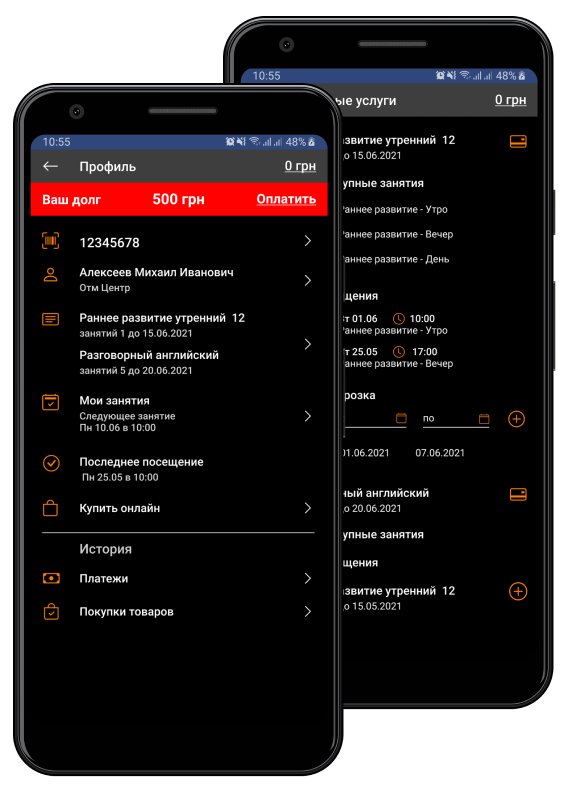
Modern users are accustomed to solving most everyday tasks through their smartphones. Ordering products, paying for services, booking tickets, or scheduling a doctor's appointment can all be done in just a few clicks. The education sector is no exception. If a learning center strives to provide a high level of service, access to key information should also be as simple and fast as possible.
That is why a mobile app for a learning center becomes an important tool for interacting with students and parents. Its main value lies not only in its functionality but also in the fact that all necessary information is available in one place and accessible at any time.
The Student Portal as a Communication Hub
One of the key features of a modern mobile solution is the student portal. It becomes a single access point to all the information that was previously scattered across various communication channels.
Students or their parents can check the current class schedule, review attendance history, see the remaining lessons included in a membership, or clarify information about upcoming classes at any time. There is no longer a need to call an administrator or search through messages in messengers.
When clients quickly receive answers to their questions, their satisfaction with the service increases significantly. A high-quality customer experience directly influences their desire to continue studying at your center.
Class Schedules Always at Hand
One of the most common reasons for contacting an administrator is to clarify the class schedule. Students forget lesson times, are unsure about schedule changes, or want to check the timetable for the following week.
If the current class schedule is available in the mobile app, most of these questions can be resolved independently. Users simply open the app and instantly receive the information they need.
For the learning center, this means reducing the workload on administrators, while clients enjoy a more comfortable interaction with the educational institution.
Transparency Increases Trust
Access to membership information also plays an important role. When students can see the number of used and available lessons, they gain better control over their learning process.
This is especially important for parents who pay for their children's education. Access to lesson balances, attendance data, and payment history creates a sense of transparency and control. As a result, the center gains a higher level of trust from its clients.
In addition, timely access to membership management information helps avoid misunderstandings regarding the number of lessons used or the validity period of lesson packages.
Engagement Directly Affects Membership Renewals
The experience of many educational centers shows that the most loyal clients are those who regularly interact with the school or training courses. When students constantly see their progress, manage their schedule, and easily access the information they need, they feel more engaged in the learning process.
On the other hand, when clients only remember the center when making the next payment or after receiving a call from an administrator, the risk of losing interest in learning increases significantly.
That is why a mobile app for students should be viewed not only as an additional service but also as a customer retention tool. The easier it is for a person to interact with a learning center, the higher the likelihood that they will continue their studies after their current membership expires.
However, even the most convenient customer portal will not deliver maximum results without active communication. To remind clients about payments, inform them about new opportunities, and encourage repeat purchases, learning centers increasingly use automated push notifications.
Push Notifications Help Sell Memberships on Time
One of the biggest challenges for any educational center is that even satisfied clients may forget important actions. A student may be completely satisfied with the training, plan to continue the course, and recommend the school to friends, yet simply miss the moment when their membership is about to expire. As a result, a break in learning occurs, which often leads to losing the client.
That is why timely communication is crucial for stable sales. A modern mobile app for a learning center allows this process to be automated through push notifications and helps maintain constant contact with students without placing additional workload on staff.
Membership Expiration Reminders
One of the most effective automations is notifying users when their membership is about to expire. Instead of having an administrator manually check dozens or hundreds of clients every day, the system sends reminders automatically at the right time.
For example, five or seven days before a lesson package expires, the student receives a notification reminding them to continue their training. The information appears directly on the smartphone screen, allowing the user to quickly make a payment decision.
Such notifications are significantly more effective than random phone calls or emails, which are often ignored.
Tracking Remaining Lessons
Automated reminders about a low lesson balance are equally valuable. Many students do not keep track of their lesson usage and may not even realize that their membership is nearly exhausted.
When the system notifies them that only two or three lessons remain, the client has enough time to decide on renewing their membership. This helps prevent interruptions in the learning process while ensuring stable repeat sales for the center.
This approach works particularly well in children's learning centers, where parents make payment decisions. Timely notifications help avoid situations where a child arrives for a class only to discover that their membership has already expired.
New Groups and Additional Learning Programs
Push notifications can be used not only for payment reminders. They are also an effective way to inform clients about new learning opportunities.
For example, a language school launches a new group focused on preparing students for an international exam. Instead of running a separate advertising campaign, the center can notify current students who are already enrolled and may be interested in continuing or expanding their learning program.
The same approach can be used to promote new courses, summer programs, intensive classes, workshops, or additional lessons. This creates extra touchpoints with clients and opens new opportunities for sales.
Special Offers Work More Effectively
Many educational centers periodically launch promotions or special conditions for continuing studies. However, even the most attractive offer will not deliver results if clients never hear about it.
Push notifications make it possible to quickly deliver information to the right audience. For example, a center may offer a discount for early membership renewal or bonus lessons for those who complete payment before a certain date.
Thanks to the speed and visibility of these notifications, response rates are usually much higher than through traditional communication channels.
Automation Instead of Manual Work
The most important advantage of push notifications is that they work automatically. Even a large educational center with hundreds of students can maintain personalized communication without constant involvement from administrators.
This is especially relevant for organizations actively implementing learning center automation. Instead of spending time on routine reminders, employees can focus more on working with clients, developing new programs, and improving service quality.
As a result, everyone benefits: students receive useful and timely information, administrators are relieved of a significant amount of manual work, and the learning center increases repeat sales and improves membership renewal rates.
However, even the most effective reminder cannot guarantee a purchase if the payment process itself remains complicated or inconvenient. That is why the next important step is enabling payments directly through the mobile app.
Online Payments Shorten the Path to Purchase
There is a simple rule in sales: the fewer actions a client needs to take to make a purchase, the higher the likelihood of successful payment. This principle works equally well for online stores and educational businesses. Even if a student has already decided to continue learning, additional steps can reduce conversion rates and postpone payment indefinitely.
Many learning centers still follow a process where clients must contact an administrator, confirm the payment amount, receive payment details, transfer funds, and notify the center about the completed payment. At first glance, the process may seem simple. In reality, however, people often postpone such actions because they are busy or simply forget to return to the matter later.
That is why online payment for classes through a mobile app becomes an important tool for increasing membership sales. It shortens the path from the purchase decision to the actual payment to just a few taps on a smartphone screen.
Clients Can Pay for Training Anytime
One of the main advantages of mobile services is 24/7 availability. Parents or students do not need to wait for an administrator’s working hours or call the learning center to clarify details.
For example, a child's mother checks the student portal in the evening after work and sees a notification that the membership is about to expire. If the system supports online payments, the renewal can be completed immediately — without phone calls, messages, or additional approvals.
In such a situation, the purchase decision is implemented instantly. If payment must be postponed until the next day, some clients will simply forget about it or return to the issue much later.
Fewer Barriers Mean More Membership Renewals
Sales losses often occur not because clients do not want to continue learning but because of minor organizational inconveniences. A person postpones payment for a few days, misses classes, loses their learning rhythm, and eventually decides to take a break.
The ability to quickly renew memberships through a mobile app significantly reduces the likelihood of such situations. Clients do not encounter unnecessary barriers and can complete the purchase exactly when they are ready.
For the learning center, this means a more stable cash flow and a higher percentage of repeat payments.
A Practical Example from a Learning Center
Imagine a language school with 300 students. Every month, some memberships expire, and the administrator spends a significant amount of time reminding students about payments.
If a student receives a push notification about an expiring lesson package and can immediately proceed to payment through the mobile app, the entire process takes only a few minutes. If they need to message an administrator and wait for a response, some payments will inevitably be postponed.
Even a modest increase of 5–10% in membership renewal conversion rates can have a significant impact on the overall revenue of a learning center throughout the year.
Automation of Financial Processes
For management, an important benefit is not only increased sales but also simplified internal processes. When online payments are integrated into a learning center management system, payment information is automatically added to the database.
Administrators no longer need to manually verify incoming payments or enter information about each transaction. The system automatically updates membership data, payment statuses, and available lessons.
This approach is an important part of educational business automation, as it reduces routine operations and minimizes the risk of errors.
Convenience Directly Impacts Revenue
Modern clients evaluate not only the quality of education but also the overall level of service. When class registration, schedule viewing, membership tracking, and payments are all available in one place, interaction with the learning center becomes much more convenient.
That is why a mobile app is gradually becoming a полноцен sales channel. It not only informs students but also helps them make purchase decisions quickly and complete them immediately. When the membership renewal process becomes as simple as possible, the number of recurring payments naturally increases.
However, a mobile app delivers the greatest results when communication takes into account the individual needs of each client. That is why personalized offers for different student groups play an important role in increasing sales.
Personalized Offers for Different Student Groups
One of the common mistakes learning centers make is using the same approach for all clients. In reality, different groups of students are at different stages of interaction with the educational center and have different needs. What is relevant for a new client may not interest a long-term student who has been studying for several years.
That is why personalization has become an important tool for increasing sales. A modern mobile app for a learning center allows relevant offers to be sent to specific user groups, making communication much more effective.
Special Offers for New Students
After their first interaction with a learning center, many potential clients are not yet ready to purchase a long-term membership immediately. At this stage, it is important to help them take the next step.
For example, after a trial lesson, a student may receive a special offer through the mobile app for their first lesson package or an additional bonus if they purchase a membership within a few days. This approach helps shorten the decision-making process and increase the conversion rate from trial lesson to paying client.
For a language school, this could be a discount on the first month of study; for a development center, an additional lesson; and for professional courses, access to learning materials.
Retaining Existing Clients
Loyal students are one of the most valuable assets of any educational business. They already trust the learning center, are familiar with the learning process, and are much more likely to renew their memberships.
That is why it makes sense to use separate motivation mechanisms for this client category. For example, offering favorable terms for paying several months in advance, bonus lessons, or special conditions for participating in new programs.
When clients feel that the center values their loyalty, the likelihood of continuing cooperation increases significantly.
Reactivating Inactive Students
Virtually every learning center has a database of clients who previously attended classes but stopped studying for various reasons. Some changed their work schedule, some took a temporary break, and others simply lost contact with the center.
These clients are already familiar with your services, so bringing them back is usually much more cost-effective than attracting completely new students.
Through a mobile app, such users can automatically receive information about new programs, new groups, seasonal promotions, or special return offers. Often, a single relevant message is enough to encourage them to resume learning.
Membership Renewal Offers
Personalized offers related to continuing studies deserve special attention. Instead of a standard payment reminder, the center can offer additional value.
For example, a student receives a notification that if they renew their membership before a certain date, they will receive an additional lesson, a fixed tuition rate for the next period, or access to a special course.
Such offers not only encourage faster decision-making but also create a sense of receiving a valuable deal.
Personalization as Part of Sales Automation
In the past, a personalized approach required significant resources and was available mainly to small learning centers. Today, the situation has changed. Thanks to modern sales automation tools for learning centers, personalized communication can work automatically even for hundreds or thousands of students.
The system analyzes membership information, learning history, customer activity, and other parameters, then sends relevant offers to the appropriate user groups. As a result, the learning center generates more repeat sales without increasing the workload of administrative staff.
However, the maximum effectiveness of personalization is achieved when the mobile app does not operate separately but functions as part of a unified digital ecosystem. That is why more and more institutions integrate mobile solutions with a CRM system for learning centers.
How a Mobile App Works Together with a CRM for a Learning Center
A mobile app alone can significantly improve interaction with students, but it delivers the greatest business value when combined with a modern CRM for a learning center. In this case, the mobile app becomes not a standalone service but part of a unified system that connects administrators, teachers, students, and parents.
Integration makes it possible to automate most routine processes and ensure real-time data accuracy. This is especially important for educational centers that aim to scale their business without proportionally increasing administrative staff.
A Unified Client Database and Up-to-Date Information
In many learning centers, customer data may be stored simultaneously in spreadsheets, messengers, accounting software, and various internal documents. This approach complicates operations and increases the risk of errors.
When a mobile app is integrated with a CRM system, all information is stored in a single database. If an administrator changes the schedule, adds a new membership, or records a payment, this data automatically becomes available in the customer portal.
As a result, students always see up-to-date information, while staff work with a single source of truth.
Automatic Membership and Payment Tracking
One of the most important areas of automation is membership management. When handled manually, tracking remaining lessons, package expiration dates, and payments takes a lot of time and often leads to mistakes.
The CRM automatically tracks used lessons, remaining classes, and membership expiration dates. This information is instantly displayed in the mobile app, where students or parents can view it.
In addition, the system allows all financial transactions to be monitored, which is especially important for managers of educational centers who need transparent sales and revenue analytics.
Automating Customer Communications
Without CRM integration, most communications must be handled manually. Administrators send payment reminders, notify students about classes, inform them about new courses, and answer repetitive questions.
When a mobile app for a school works together with a CRM, a significant part of these processes is automated. The system independently sends membership expiration notifications, informs users about schedule changes, reminds them about payments, and helps maintain regular contact with clients.
As a result, communication becomes systematic rather than dependent on the workload of individual employees.
Less Routine Work for Administrators
One of the main outcomes of automation is a significant reduction in manual tasks. Administrators no longer spend hours checking payments, updating student lists, or sending identical messages.
Instead, employees can focus on tasks that truly require attention: working with new clients, improving service quality, organizing the learning process, and developing the center.
For business owners, this means not only saving time but also improving the efficiency of the entire team.
A Unified Ecosystem for Managing an Educational Business
A modern learning center management system has long evolved beyond simply maintaining schedules or tracking students. It helps manage sales, finances, communications, and customer experience within a single digital environment.
In such an ecosystem, the CRM is responsible for internal processes and team automation, while the mobile app provides convenient interaction with students and parents. Together, they create a seamless customer journey — from the first class registration to regular membership renewals.
That is why many centers implementing comprehensive learning center automation view the mobile app and CRM not as separate products but as interconnected tools for business growth. This approach helps increase customer loyalty, boost repeat sales, and create a strong foundation for future expansion.
Conclusion
Today, a mobile app for a learning center is much more than just an additional service for students. It becomes an important tool for communication, customer retention, and educational business growth. Thanks to quick access to information, a convenient customer portal, automated reminders, and online payment capabilities, learning centers gain additional opportunities to increase revenue.
A mobile app helps keep students informed about upcoming membership expirations, simplifies membership renewals, increases engagement, and improves the overall customer experience. As a result, the number of repeat sales grows, while the risk of losing students due to organizational inconveniences is significantly reduced.
The greatest impact is achieved when the mobile app works together with a CRM system. Such integration ensures effective learning center management, automates communications, simplifies payment control, helps manage memberships, and creates a unified customer interaction system.

For a language school, children's learning center, development school, or any other educational project, this means not only improving service quality but also achieving real business growth. That is why a mobile app combined with a CRM has become one of the key elements of modern educational business automation and sustainable learning center scaling.
Get a Consultation11.06.2026

How to Choose a CRM for a Training Center: 10 Features Without Which the Center Loses Clients and Money
Many educational centers start with simple tools: Excel spreadsheets, Google Sheets, notes in messengers, or even paper journals. At the beginning, this is often enough — when there are only a few groups, one administrator, and dozens of students.
But as the center begins to grow, manual management gradually turns into a source of constant mistakes, wasted time, and financial chaos. The number of students, groups, teachers, memberships, payments, and leads increases. Administrators spend more and more time on routine tasks, while the owner loses control over processes.
This is exactly when most educational centers begin looking for a CRM system to automate their operations.

Why Excel Stops Working as an Educational Center Grows
Excel and Google Sheets have one major problem — they are not designed for comprehensive educational center management. They work well for storing data, but not for automating processes.
As a result, typical problems appear:
- leads from potential students get lost;
- administrators confuse schedules or memberships;
- some payments are not recorded on time;
- it becomes difficult to track client debts;
- there is no unified student database;
- teachers work in different spreadsheets and chats;
- the owner cannot see the real financial picture.
Another issue is the human factor. Even one accidentally deleted formula or incorrect table edit can create serious accounting errors.
How Process Chaos Directly Affects Profit
Many educational center owners underestimate how much money is lost due to disorganized processes.
For example:
- a client was not reminded about a class — they missed the lesson and gradually stopped attending;
- an administrator forgot to call back a lead — the potential student went to competitors;
- there are empty spots in groups due to poor enrollment control;
- the manager cannot identify weak groups or unprofitable directions;
- teachers are overloaded or, наоборот, do not have enough teaching hours.
All of this directly affects the educational center’s revenue, even if the problem is not immediately noticeable.
What Is a CRM for an Educational Center
A CRM for an educational center is a system that helps automate core business processes: managing the student database, class schedules, payment tracking, attendance control, administrator workflows, client communication, and financial analytics.
In practice, a CRM system becomes a single management center for the educational business, where all information is stored in one place.
A modern CRM for an educational center allows you to:
- control all leads and sales;
- automate class enrollment;
- manage electronic schedules;
- track payments and debts;
- monitor attendance;
- analyze profit and group workload;
- reduce the amount of manual work for administrators.
As a result, the educational center operates much more stably, scales faster, and becomes less dependent on the human factor.
How to Understand That Your Educational Center Already Needs a CRM
Many educational center owners postpone automation because it seems like: “it’s still too early,” “we’re managing manually for now,” or “spreadsheets are enough.” But in practice, most centers start losing money long before the problems become critical.
Usually, the need for a CRM system appears not when the center is already large, but when manual management begins taking too much time and creating too many mistakes.
Below are the main signs that show an educational center already needs a CRM to automate operations.
1. Leads from Potential Students Are Being Lost
One of the most common problems is that leads come from different sources: website, Instagram, Facebook, Telegram, Viber, phone calls. Some messages get lost, administrators forget to call back, or respond too late.
As a result, potential clients simply go to competitors.
A CRM for an educational center allows you to automatically collect all leads into one system and control their processing.
2. Administrators Spend Too Much Time on Routine Tasks
If an administrator spends most of the day:
- checking payments manually;
- constantly clarifying schedules;
- sending reminders to clients;
- maintaining several spreadsheets at the same time;
- counting remaining membership classes;
— this means that a significant part of the work is still not automated.
In a CRM, most of these processes are performed automatically, significantly reducing the workload on the team.
3. Confusion with Payments and Memberships Begins
At the beginning, controlling finances is easy. But as the number of students grows, the following issues appear:
- overdue payments;
- debts;
- balance errors;
- incorrectly deducted classes;
- loss of payment information.
It becomes especially difficult to manage manually if the educational center has different membership formats, individual lessons, or multiple branches.
A CRM system automates financial management and allows you to see the current situation in real time.
4. The Owner Cannot See the Real Business Picture
One of the main problems of manual management is the lack of proper analytics.
Without a CRM, it is often difficult for the owner to quickly answer simple questions:
- which groups generate the most profit;
- which направления are underperforming;
- how much debt clients have;
- what the teacher workload is;
- how many new leads come in each month;
- what the center’s actual revenue is.
A CRM for an educational center collects this data automatically and generates clear reports for management.
5. Managing Class Schedules Becomes Difficult
The more groups and teachers there are, the harder it becomes to maintain order in schedules manually.
Typical problems include:
- classroom overlaps;
- double bookings;
- mistakes when rescheduling classes;
- loss of the current schedule version;
- chaos in teacher substitutions.
A CRM allows you to maintain a centralized electronic schedule and quickly make changes without the risk of errors.
6. The Educational Center Is Growing, but Processes Do Not Scale
Many centers face a situation where the number of students grows, but the team begins to “drown” in manual work.
As a result:
- the workload on administrators increases;
- service quality decreases;
- the number of mistakes grows;
- the owner constantly interferes in operational processes.
A CRM system is needed precisely so that an educational center can scale without chaos and loss of control.
7. The Team Works in Different Spreadsheets and Messengers
If part of the information is stored in Excel, another part in Viber, and more in Telegram or administrator notes, this creates constant risks of data loss.
A CRM combines all key processes into a single system where every employee has access to up-to-date information.
CRM Is Not “Only for Large Businesses,” but for Those Who Want Order
Many owners mistakenly believe that CRM systems are needed only for large networks or schools with hundreds of students.
In reality, automation helps small and medium-sized educational centers the most because it allows them to:
- save team time;
- reduce operational chaos;
- avoid losing clients;
- better control finances;
- prepare the business for growth.
The earlier an educational center implements a CRM system, the easier it becomes to scale processes in the future.
1. Unified Student and Client Database
One of the most important functions of a CRM for an educational center is creating a unified centralized database of students, clients, and leads. This is usually where real automation begins.
In many educational centers, information is stored chaotically: some data is in Excel, some in the administrator’s phone, and some in messengers or notebooks. As a result, the team constantly wastes time searching for information and makes mistakes.
A CRM system combines all data in one place and allows quick access to complete information about every client.
What Data Does a CRM for an Educational Center Store
A modern CRM system allows you to manage:
- student and parent contacts;
- lead history;
- class schedules;
- attendance;
- payments and debts;
- active memberships;
- communication history;
- administrator notes;
- assigned groups and teachers.
All information is available in just a few clicks, without the need to search through different spreadsheets or chats.
Why Excel Creates Problems When Managing a Student Database
At the beginning, Excel seems like a simple solution. But as the number of students increases, spreadsheets start creating more problems than benefits.
The most common situations include:
- duplicate clients;
- outdated contacts;
- accidental data deletion;
- formula errors;
- confusion between administrators;
- lack of change history;
- difficulty for several employees to work simultaneously.
This becomes especially critical for educational centers with many groups, teachers, or branches.
CRM Helps Prevent Client Loss
When the client database is structured, administrators work much faster and more efficiently.
For example, a CRM allows you to instantly see:
- when the student last attended a class;
- whether there is an overdue payment;
- which membership is active;
- which courses interested the client;
- whether classes were missed;
- which messages have already been sent.
This significantly improves service quality and helps retain students for a longer time.
Less Dependence on a Specific Administrator
One major problem with manual management is critical dependence on a specific person.
If an administrator resigns or goes on vacation, part of the information may be lost or remain “only in their head.”
A CRM for an educational center solves this problem because all data is stored in the system:
- communication history;
- leads;
- payments;
- notes;
- client statuses.
A new administrator can quickly start working without losing information.
Faster Access to Information = Better Service
Modern clients expect quick responses and high-quality service. If an administrator spends several minutes searching for information about a student, it creates a negative impression.
A CRM allows you to access complete client information in just a few seconds. This is especially important for:
- language schools;
- children’s centers;
- preparation courses;
- online schools;
- educational center networks.
The faster the team works with information, the higher the level of service and client loyalty.
A Unified Database Is the Foundation of Educational Center Automation
Without a centralized database, it is impossible to properly automate other processes: scheduling, finances, attendance, communication, or analytics.
That is why a quality CRM for an educational center always begins with a properly organized student and client management system.
2. Online Enrollment and Lead Processing Without Losses
For most educational centers, new leads are the main source of growth. But in practice, a significant portion of potential clients is lost before the first class.
The reason is simple: leads come from different channels, administrators do not have time to process them, messages get lost, and responses are delayed.
A CRM for an educational center allows you to centralize all leads and build a clear process for working with new clients.
Why Educational Centers Lose Leads
In most centers, leads come simultaneously from several sources:
- website;
- Instagram;
- Facebook;
- Telegram;
- Viber;
- phone calls;
- Google ads;
- course enrollment forms.
When all these channels are not connected into one system, typical problems begin:
- the administrator forgot to reply;
- the lead got lost in a messenger;
- the client received a response several hours later or the next day;
- there is no control over who processes the lead;
- the manager cannot see the number of new inquiries.

In the education industry, response speed has a major impact on sales. If a potential student does not receive a quick response, they can easily choose another educational center.
How CRM Automates Lead Processing
A CRM system for an educational center automatically collects all leads into a single database.
For example:
- a client submitted a request on the website;
- the CRM automatically created a new lead;
- the administrator received a notification;
- the system immediately shows the lead source;
- the manager sees the processing status.
This significantly reduces the number of lost clients.
All Leads in One Place
One of the main advantages of a CRM is centralized tracking of all inquiries.
The administrator no longer searches for messages across different messengers or chats. All information is available in one system:
- contact details;
- the course or direction the client is interested in;
- communication history;
- lead status;
- responsible manager;
- trial lesson booking.
This greatly simplifies the team’s work and allows control over lead processing quality.
Educational Center Sales Funnel Control
Without a CRM, managers often do not understand:
- how many leads actually come in;
- which advertising channels work best;
- how many clients reach the payment stage;
- where exactly potential students are lost.
A CRM allows you to see the entire sales funnel:
- new lead;
- client contact;
- trial lesson booking;
- membership sale;
- repeat purchases.
Thanks to this, you can identify weak points in the sales process and improve conversion rates.
Automatic Reminders and Tasks
A CRM for an educational center helps ensure important actions are not forgotten.
For example, the system can automatically:
- remind the administrator to call the client back;
- create tasks for new leads;
- send notifications about trial lessons;
- remind about unpaid requests;
- monitor overdue leads.
This minimizes the human factor and helps avoid losing potential students due to inattention.
Fast Response = More Students
In today’s education market, lead response speed directly affects the number of sales.
Educational centers that automate lead management through CRM usually:
- respond to clients faster;
- lose fewer leads;
- better control administrator performance;
- have higher payment conversion rates.
That is why enrollment and lead processing automation is one of the core functions of a modern CRM for an educational center.
3. Automatic Class Scheduling
Scheduling is one of the most complex processes in the operation of an educational center. The more groups, teachers, and directions there are, the harder it becomes to maintain order manually.
At the beginning, many centers manage schedules in spreadsheets or even messengers. But as the number of students grows, this system begins creating constant chaos.
A CRM for an educational center allows you to automate class scheduling and significantly reduce the number of mistakes.
What Problems Arise with Manual Scheduling
When schedules are managed manually, administrators constantly face the same problems:
- group or classroom overlaps;
- double-booked teachers;
- confusion when rescheduling classes;
- mistakes in times or dates;
- outdated schedule versions;
- difficulty managing teacher substitutions;
- manual notifications to all students about changes.
It becomes especially difficult to work without automation if the educational center has:
- multiple branches;
- a large number of groups;
- individual lessons;
- flexible teacher schedules;
- online and offline learning formats simultaneously.
How CRM Automates Educational Center Scheduling
A CRM system allows you to manage a centralized electronic schedule where all information is updated in real time.
In the system, you can:
- create groups and courses;
- assign teachers;
- assign classrooms;
- manage the class calendar;
- control group capacity;
- quickly reschedule or cancel classes.
All changes are automatically reflected in the system, so the team always works with up-to-date information.
Fewer Errors and Overlaps
One of the main advantages of a CRM is minimizing the human factor.
The system helps avoid situations where:
- two groups are assigned to the same classroom;
- a teacher is scheduled for several classes at the same time;
- an administrator accidentally creates a duplicate class;
- clients receive incorrect class times.
For an educational center, this is not only a matter of convenience but also reputation. Constant scheduling confusion directly affects client trust.
Quick Rescheduling and Class Substitutions
Schedule changes happen regularly in educational centers:
- a teacher got sick;
- a group rescheduled a class;
- the classroom changed;
- an extra lesson needs to be added.
With manual management, such changes create additional workload for administrators.
A CRM allows you to make changes in just a few clicks and automatically update information for the entire team.
Convenient Schedules for Administrators, Teachers, and Students
A modern CRM for an educational center makes schedules convenient for all participants in the process.
Administrators can:
- see the full group workload;
- control available spots;
- quickly find needed classes;
- manage calendar changes.
Teachers receive:
- an up-to-date class schedule;
- group information;
- student lists;
- details about rescheduling and substitutions.
Students and parents can also receive timely notifications about schedule changes.
Group and Classroom Workload Control
A CRM helps use educational center resources more efficiently.
Managers can analyze:
- which groups are overcrowded;
- where free spots remain;
- which classrooms are underutilized;
- which directions have the highest workload.
This allows better planning for new group enrollment and center scaling.
Schedule Automation Saves Team Time
Without a CRM, administrators spend enormous amounts of time manually managing calendars, checking changes, and notifying clients.
An automated schedule significantly reduces routine work and helps the educational center operate more stably even during active growth.
4. Membership, Payment, and Debt Management
Financial management is one of the most critical areas in the operation of an educational center. This is where manual data management most often leads to mistakes, financial losses, and conflicts with clients.
As the number of students grows, managing memberships and payments through Excel or messenger notes becomes increasingly difficult. Administrators spend a lot of time on checks, while managers do not always see the real financial situation.
A CRM for an educational center automates financial management and helps keep all payments under control.
Why Manual Payment Management Creates Problems
In practice, most problems arise not because of missing payments, but because of the difficulty of tracking them.
Typical situations include:
- the administrator forgot to record a payment;
- the remaining class balance was calculated incorrectly;
- the client claims they have already paid;
- transfer information was lost;
- it is difficult to track partial payments;
- there is no debt control.
The more groups and learning formats there are, the faster financial management turns into chaos.
CRM Automatically Manages Memberships
Most educational centers use different types of memberships:
- for a specific number of classes;
- monthly payments;
- individual lessons;
- package courses;
- unlimited formats.
A CRM system allows you to automatically manage all options without manual calculations.
The system can:
- display the active membership;
- calculate remaining classes;
- track expiration dates;
- automatically deduct lessons after attendance;
- show usage history.
This helps avoid disputes and reduces the workload on administrators.
Real-Time Payment Control
One of the key advantages of a CRM for an educational center is up-to-date financial information.
An administrator or manager can see at any moment:
- who has paid for training;
- who has outstanding debt;
- when the last payment was made;
- which groups have the highest number of debts;
- the overall financial condition of the center.
This allows faster responses to problems and helps avoid revenue loss due to inattention.
Automatic Payment Reminders
One of the reasons for overdue payments is that clients simply forget the payment date.
A CRM helps solve this problem with automatic reminders.
The system can send notifications:
- about membership expiration;
- about upcoming payments;
- about overdue payments;
- about the need to renew a course.
Such notifications not only reduce the number of debts but also help retain students in the educational center.
Transparent Financial Management for Managers
Without a CRM, owners often receive financial data with delays or have to manually check spreadsheets and reports.
A CRM system provides much greater transparency:
- revenue by groups and directions;
- payment dynamics;
- total debt amount;
- cash inflows;
- financial reports for a selected period.
Managers see the numbers in real time and can make decisions based on data rather than assumptions.
Fewer Financial Mistakes and Conflicts
Financial misunderstandings are one of the common causes of conflicts with clients.
When a CRM records payment and deduction history, any situation can be quickly verified:
- when the payment was made;
- which course or membership it was applied to;
- how many classes remain;
- which payments were made previously.
This protects both the educational center and the client.
Financial Automation = A More Stable Business
An educational center may actively attract new students, but without payment and debt control, part of the revenue will still be lost.
That is why membership and financial management is one of the key functions of a CRM for an educational center, without which it is difficult to ensure stable growth and operational order.
5. Student Attendance Tracking
Attendance tracking is another important process that directly affects the revenue and stability of an educational center. If the center does not monitor missed classes, student churn gradually increases, membership renewals decrease, and client engagement drops.
With manual management, administrators and teachers often do not have the full picture: who regularly misses lessons, which groups are less active, and which students are at risk of stopping their studies.
A CRM for an educational center helps automate attendance tracking and quickly respond to problematic situations.
Why Attendance Tracking Matters
In many educational centers, absences begin to accumulate gradually:
- a student missed one class;
- then another one;
- engagement decreases;
- the client stops renewing the membership.
Without systematic monitoring, the team often notices the problem only when the student has effectively stopped attending.
A CRM allows you to identify such situations in time and work on client retention.
Electronic Attendance Marking
A modern CRM for an educational center allows quick attendance tracking during classes.
A teacher or administrator can:
- mark attendance in a few clicks;
- see the group list;
- monitor absences;
- record makeup classes;
- mark trial lessons.
All information is automatically stored in the system and linked to the student’s profile.
CRM Helps Retain Students
One of the key tasks of an educational center is not only attracting new clients but also retaining current ones.
A CRM allows you to quickly notice warning signs:
- regular absences;
- decreased activity;
- long student absences;
- membership non-renewal.
An administrator can promptly contact the client, clarify the reason, and offer solutions:
- makeup classes;
- schedule changes;
- transfer to another group;
- a temporary study pause.
This approach helps reduce student churn and increase client loyalty.
Attendance Analytics for Managers
A CRM for an educational center allows attendance analysis not only for individual students but also for the entire center.
Managers can see:
- the most active groups;
- courses with the highest number of absences;
- class workload levels;
- attendance statistics for a selected period;
- groups at risk of student churn.
This data helps make more accurate management decisions.
Less Manual Work for Teachers and Administrators
Without a CRM, attendance tracking is often kept in journals, spreadsheets, or separate chats. This creates unnecessary workload for the team and makes it harder to find information.
An automated system allows you to:
- track attendance faster;
- reduce the number of errors;
- avoid duplicating information;
- see the full lesson history.
This is especially important for educational centers with a large number of groups or multiple branches.
Attendance Tracking Is Not Only Accounting, but Also Revenue Control
Regular class attendance directly affects course renewals, membership sales, and the overall stability of the center’s income.
That is why a modern CRM for an educational center should not only record student attendance but also help manage client retention and group engagement.
6. CRM for Teachers and Workload Management
The success of an educational center depends not only on the number of students but also on the efficient organization of teachers’ work. As the center grows, managing schedules, substitutions, workloads, and payroll manually becomes increasingly difficult.
Without automation, managers often lack a complete picture:
- who is overloaded;
- who has too few classes;
- where scheduling conflicts occur;
- how to correctly calculate salaries.
A CRM for an educational center helps centrally manage teacher operations and reduces organizational chaos.
A Unified Schedule for the Entire Team
In many educational centers, teachers receive schedule information via messengers or separate spreadsheets. This often leads to misunderstandings and mistakes.
A CRM system allows you to create a single up-to-date schedule where teachers can see:
- their groups;
- class times;
- classrooms;
- reschedules;
- substitutions;
- student lists.
All changes are updated in real time, so the team always works with current information.
Teacher Workload Control
As an educational center grows, it is important to distribute workload evenly among teachers.
Without a CRM, it is difficult for managers to quickly assess:
- how many classes each teacher conducts;
- who has an overloaded schedule;
- where free time slots exist;
- which groups need an additional teacher.
A CRM for an educational center allows all this data to be viewed in one place and helps better plan team operations.
Fast Management of Substitutions
In any educational center, situations regularly arise where a teacher must be replaced urgently:
- illness;
- vacation;
- schedule changes;
- additional lessons.
With manual management, this creates a significant workload for administrators.
A CRM allows you to:
- quickly find available teachers;
- update schedules;
- automatically log changes;
- notify students about rescheduling.
This helps avoid confusion and canceled lessons.
Automatic Salary Calculation
One of the most time-consuming tasks in an educational center is calculating teacher salaries.
This is especially difficult when:
- teachers are paid hourly;
- there are different rates for group and individual lessons;
- substitutions must be included;
- some classes are rescheduled or canceled.
A CRM system automatically records completed lessons and helps generate accurate payroll data.
This saves accounting time and reduces the risk of financial errors.
Transparency of Team Performance
For an educational center manager, it is important to understand how the team works and how effectively resources are used.
A CRM allows analysis of:
- teacher workload;
- number of completed lessons;
- group activity;
- student attendance;
- performance of specific programs.
This helps make more informed decisions about the center’s development.
Less Organizational Chaos
When an educational center operates without a CRM, a significant amount of time is spent clarifying:
- who is conducting the class;
- where the lesson takes place;
- whether there is a substitution;
- what the current schedule is.
Automation reduces manual communication and makes processes more predictable.
CRM Helps Scale the Team
The more teachers work in an educational center, the harder it is to manage processes manually.
A CRM for an educational center helps build a systematic team workflow where:
- everyone follows unified rules;
- information is not lost;
- the schedule is centrally managed;
- the manager sees the full picture of operations.
That is why teacher workflow automation is one of the key functions of a modern CRM system for education.
7. Automatic notifications for clients
Communication with students and parents takes up a significant part of the educational center administrator’s work. Class reminders, payment notifications, lesson rescheduling, or schedule changes — all of this requires constant attention.
As the center grows, manually sending messages starts taking too much time and creates a risk of mistakes. Administrators may forget to notify clients or do it too late.
A CRM for an educational center allows most communications to be automated and significantly improves service quality.
Why manual communication stops working
At the beginning, an administrator may still manually message all clients in messengers or call them. But as the number of groups grows, this becomes practically impossible.
As a result, typical problems arise:
- students forget about classes;
- clients were not informed about rescheduling;
- the administrator missed a message;
- payment reminders arrive too late;
- part of the communication gets lost in chats.
All of this negatively affects service quality and customer loyalty.
What notifications a CRM can automate
A modern CRM for an educational center allows automatic sending of various types of notifications.
For example:
- class reminders;
- payment reminders;
- membership expiration information;
- trial lesson registration confirmations;
- notifications about new courses or enrollments.
This significantly reduces the workload on administrators and helps avoid human errors.
Class reminders reduce the number of absences
Even responsible students or parents may forget about classes, especially if the schedule changes or the center has many groups.
Automatic reminders help:
- reduce the number of absences;
- increase attendance;
- maintain group stability;
- improve learning discipline.
For an educational center, this directly affects membership renewals and income stability.
Quick notifications about schedule changes
Class rescheduling or teacher changes are common situations for many educational centers.
Without a CRM, administrators are forced to manually notify dozens of students, which takes a lot of time and creates a risk of mistakes.
A CRM allows automatic notifications to be sent to all group participants:
- via SMS;
- Telegram;
- email;
- push notifications.
This makes communication much faster and more convenient.
Payment control through automatic notifications
One of the most useful CRM features is automatic payment reminders.
The system can:
- remind clients about membership expiration;
- notify about overdue payments;
- inform about remaining classes;
- send payment confirmations.
Such notifications help reduce the number of debts and simplify administrators’ work.
CRM helps maintain high-quality service
Modern clients expect fast and clear communication. If an educational center regularly forgets to notify about changes or remind clients about important information, it worsens the service experience.
Notification automation allows educational centers to:
- look more professional;
- increase customer loyalty;
- reduce misunderstandings;
- improve process organization.
Less workload for administrators
In many educational centers, administrators spend several hours every day only on messages and reminders.
CRM automates these processes and allows the team to spend more time on:
- working with new leads;
- customer support;
- sales;
- organizing the educational process.
As a result, the educational center operates faster, more steadily, and with less time spent on routine tasks.
Communication automation is already the standard for modern educational centers
The larger the educational center becomes, the harder it is to maintain high-quality communication manually.
That is why automatic notifications have become one of the core CRM features for educational centers, helping simultaneously improve service, reduce chaos, and avoid losing clients due to organizational mistakes.
8. Financial analytics and profit control
Many educational centers face a situation where money seems to be “there,” students are studying, groups are running — but the owner does not see the real financial picture of the business.
Without a CRM, financial analytics is usually managed manually: in spreadsheets, separate reports, or even “from memory.” Because of this, it becomes difficult for managers to quickly evaluate the center’s performance and make accurate management decisions.
A CRM for an educational center allows automatic collection of financial data and provides real-time visibility into key business metrics.
Why it is difficult to manage an educational center without analytics
As the center grows, intuitive management is no longer enough.
The owner needs to understand:
- which areas generate the most profit;
- which groups operate inefficiently;
- how much income each branch generates;
- the real amount of debt;
- how revenue changes month by month;
- which courses have the best occupancy rates.
Without a CRM, getting this data quickly and without mistakes is very difficult.
CRM automatically collects financial metrics
A modern CRM for an educational center combines:
- student payments;
- memberships;
- attendance;
- schedules;
- groups and teachers.
Thanks to this, the system automatically generates up-to-date financial statistics without manual calculations.
Managers can see at any moment:
- total revenue;
- profit by course;
- payments for a period;
- sales dynamics;
- debts;
- group occupancy.
Analysis of group and course efficiency
Not all courses in an educational center are equally profitable. Some groups may be overcrowded, while others may operate almost at a loss.
CRM helps quickly identify such problems.
The system allows analysis of:
- the number of students in groups;
- income by each area;
- occupancy percentage;
- course popularity;
- enrollment dynamics.
This allows more effective planning of the educational center’s development.
Debt and overdue payment control
Without systematic control, client debt often accumulates unnoticed.
CRM allows quick visibility into:
- who has not paid for classes;
- amounts of overdue payments;
- groups with the highest number of debts;
- payment dynamics by month.
This allows administrators to quickly work with overdue payments and managers to control financial discipline.
Transparency of administrators’ and branches’ performance
For network educational centers, it is especially important to see the financial situation of each branch separately.
A CRM system allows:
- analyzing revenue by location;
- monitoring administrators’ performance;
- tracking enrollment efficiency;
- comparing branch performance.
This greatly simplifies management of a network of educational centers.
Quick reports without manual work
One of the biggest advantages of CRM is automatic report generation.
Without CRM, administrators and managers often spend hours on:
- collecting data from spreadsheets;
- checking payments;
- calculating revenue;
- analyzing attendance;
- preparing financial reports.
CRM automates these processes and allows access to up-to-date statistics in just a few clicks.
Data helps make the right decisions
When the owner of an educational center sees real numbers, it becomes much easier to:
- open new groups;
- close weak areas;
- redistribute workloads;
- control profitability;
- plan business scaling.
A CRM for an educational center transforms business management from “manual mode” into systematic work based on specific metrics.
Financial analytics is the foundation of stable growth
An educational center may have a strong team and a quality product, but without controlling the numbers, it is difficult to manage the business effectively.
That is why a modern CRM system should not only manage student records and schedules, but also help owners see the complete financial picture and control profits in real time.
9. CRM for a network of educational centers and branches
When an educational center opens a second or third branch, manual process management becomes much more complicated. What worked for a single location starts creating chaos across the network.
New challenges appear:
- monitoring administrators across different branches;
- a unified student database;
- centralized scheduling;
- financial reporting by location;
- teacher workload management;
- analysis of each branch’s performance.
A CRM for an educational center helps manage the entire network within a single system and maintain control while scaling the business.
One system for all branches
Without a CRM, each branch often operates “on its own”:
- separate spreadsheets;
- different accounting rules;
- unsynchronized client databases;
- different report formats;
- manual information transfer.
As a result, it becomes difficult for managers to get a complete picture of the network’s operations.
CRM allows all branches to be combined into one centralized system where:
- all data is updated in real time;
- a unified client database is available across the entire network;
- managers can see the performance of each location;
- processes operate according to unified standards.
Administrator performance control
When an educational center has multiple branches, it becomes difficult for owners to manually monitor administrators’ work.
A CRM system allows visibility into:
- how many leads each administrator processes;
- how quickly the team responds to clients;
- the number of trial lesson bookings;
- conversion into payments;
- overdue tasks or unprocessed leads.
This helps maintain the same level of service across all branches.
Financial analytics for each location
For network educational centers, it is important to separately analyze the performance of each branch.
CRM allows control over:
- revenue by location;
- group occupancy;
- the number of active students;
- client debts;
- course efficiency;
- enrollment dynamics.
Thanks to this, managers can quickly see which branches operate efficiently and which require changes.
A unified student database for the entire network
Without CRM, client information is often “tied” to a specific branch or administrator.
This creates problems if:
- a student transfers between branches;
- a client changes their schedule;
- payment or attendance history needs to be found quickly;
- part of the team works remotely.
A CRM for an educational center allows maintaining a unified client database where all information is accessible regardless of location.
Access permissions for different employees
In network educational centers, it is important to properly separate access to information.
CRM allows configuring roles and permissions:
- an administrator sees only their branch;
- a teacher has access only to their own groups;
- the manager sees the entire network;
- the accountant works only with finances.
This helps improve data security and makes the team’s work more organized.
Standardization of processes across the network
One of the biggest challenges when scaling a network is different work approaches across branches.
CRM helps standardize:
- lead processing;
- schedule management;
- payment control;
- debt management;
- communication with clients;
- report generation.
As a result, the educational center operates as a unified system rather than a collection of separate offices.
CRM helps scale the educational business
The more branches an educational center opens, the more important process automation becomes.
Without CRM, the owner gradually starts spending most of their time manually controlling operational processes.
A modern CRM for an educational center allows:
- centralized network management;
- monitoring key metrics;
- reducing chaos during scaling;
- maintaining unified operating standards.
That is why automation becomes critically important for educational centers planning growth and network expansion.
10. Integrations: website, messengers, IP telephony, and payment systems
A modern educational center uses dozens of different services: websites, social media, messengers, telephony, online payments, advertising platforms, and other tools for working with clients.
If all these systems are not connected with each other, the team is forced to perform many actions manually:
- transferring leads;
- copying contacts;
- checking payments;
- searching call history;
- duplicating messages.
A CRM for an educational center allows key services to be combined into a single system and significantly automates the team’s work.
CRM integration with the educational center’s website
For most centers, the website is one of the main channels for attracting new students.
Without integration, administrators often have to manually transfer applications from registration forms into spreadsheets or messengers.
CRM automates this process:
- a website application immediately appears in the system;
- a new lead is created;
- a responsible manager is assigned;
- the inquiry source is saved;
- managers can see lead statistics.
This helps process inquiries faster and avoid losing potential clients.
IP telephony and call monitoring
Phone calls remain an important sales channel for many educational centers.
CRM with IP telephony support allows:
- automatic call logging;
- saving communication history;
- tracking who handled the inquiry;
- monitoring missed calls;
- analyzing administrators’ performance quality.
This is especially important for centers with a large flow of new leads.
Online payments and financial automation
More and more educational centers are switching to online payments through banking services and payment systems.
CRM integration with payment systems allows:
- faster payment recording;
- automatic payment status updates;
- reducing the number of manual checks;
- monitoring debts;
- simplifying financial accounting.
As a result, the team spends less time on routine financial operations.
Integrations help eliminate duplicated work
Without automation, educational center employees often repeat the same actions across different systems:
- copy contacts;
- manually transfer leads;
- separately check payments;
- duplicate client information.
CRM with properly configured integrations allows a significant reduction in manual work and minimizes errors.
Why “closed” systems create problems
Some CRMs have limited integration capabilities or operate completely isolated from other services.
In the future, this can create serious problems:
- difficulty scaling;
- inability to connect new tools;
- manual data synchronization;
- additional workload on the team.
That is why when choosing a CRM for an educational center, it is important to pay attention not only to basic features, but also to integration capabilities with other services.
Integrations make the educational center more systematic
The more processes are automated and combined into one system, the more stable the educational center operates.
CRM with integrations helps:
- process leads faster;
- better control communication;
- automate finances;
- reduce administrators’ workload;
- improve service quality.
That is why a modern CRM for an educational center should not be just a standalone program, but the management center for all key business processes.
CRM or Excel for an educational center: which is more cost-effective?
Many educational centers postpone CRM implementation because they are used to working in Excel or Google Sheets. At first glance, spreadsheets seem like a simple and inexpensive solution.
But when the center starts growing, manual record keeping gradually begins taking more time, creating mistakes, and slowing down business development.
To understand the difference, it is important to compare CRM and Excel not only by cost, but also by their capabilities for the real work of an educational center.
Excel is suitable only at the beginning
Spreadsheets can be convenient when:
- the center has a small number of students;
- there are 1–2 groups;
- all processes are controlled by the owner;
- there is no complex schedule;
- the team is small.
But as the number of students and employees grows, Excel starts creating more and more limitations.
Main problems of Excel for an educational center
- lack of automation;
- manual payment control;
- no automatic reminders;
- difficult schedule management;
- high risk of mistakes;
- duplicate information;
- no unified client interaction history;
- difficult administrator performance control;
- limited analytics capabilities.
The larger the educational center becomes, the more time the team spends on manual processes.
What CRM provides for an educational center
A CRM system is designed specifically to automate daily operations.
Unlike Excel, CRM allows:
- maintaining a unified student database;
- automating schedules;
- controlling payments and debts;
- tracking attendance;
- collecting leads from websites and messengers;
- sending automatic notifications;
- analyzing financial metrics;
- monitoring team performance.
As a result, the educational center operates much more systematically and depends less on manual work.
Comparison of CRM and Excel for an educational center
Hidden costs of manual record keeping
Many owners evaluate only the direct costs of CRM, but do not take into account the losses caused by manual work.
In reality, Excel often becomes more expensive because of:
- lost leads;
- payment mistakes;
- slow administrator performance;
- customer churn caused by poor service;
- chaos in scheduling;
- a large number of manual tasks.
CRM helps reduce these losses and makes the center’s operations more stable.
CRM saves not only time, but also resources
Automation allows the team to spend less time on routine processes:
- client reminders;
- payment checks;
- schedule management;
- report generation;
- lead processing.
As a result, administrators can spend more time on service, sales, and working with students.
When an educational center definitely needs a CRM
As a rule, CRM becomes necessary if:
- the center has more than 50–100 active students;
- there are several administrators;
- many groups or teachers are working;
- problems with payments and scheduling appear;
- the owner wants to scale the business.
Under these conditions, manual record keeping starts slowing down the development of the educational center.
CRM is an investment in systematic growth
Excel may be a temporary solution at the beginning, but stable growth of an educational center requires a full automation system.
A CRM for an educational center helps:
- organize processes;
- reduce the number of mistakes;
- better control finances;
- avoid losing clients;
- scale the business without chaos.
That is why most modern educational centers gradually move from spreadsheets to specialized CRM systems for education.
Typical mistakes when choosing a CRM for an educational center
Choosing a CRM for an educational center is not just buying software, but a decision that directly affects team efficiency, service quality and business scalability.
Many centers implement CRM hastily or focus only on price. As a result the system does not solve real business problems, the team does not use it, and part of the processes still have to be done manually.
To avoid unnecessary time and money costs it is important to know the most common mistakes when choosing a CRM for an educational center.
1. Choosing an overly complex CRM
One of the most common mistakes is implementing a “heavy” universal CRM designed for large corporations or complex sales rather than for educational business.
As a result:
- the team spends a long time learning to work;
- administrators get confused in the interface;
- part of the functions are not used at all;
- processes become even more complicated.
For an educational center it is important to choose a CRM adapted specifically for the education sector: with schedule, subscriptions, attendance and group management.
2. Focusing only on low price
A cheap CRM is not always a profitable one.
Often budget systems have serious limitations:
- no automation;
- weak analytics;
- limited integrations;
- lack of technical support;
- uncomfortable interface.
As a result the educational center still continues to manage part of the processes manually.
When choosing a CRM it is important to evaluate not only the cost, but also how much time and resources the system can really save.
3. CRM not adapted for an educational center
Some CRMs work well for sales or service business, but are poorly suited for education.
If the system does not have basic functions for an educational center, problems arise:
- no proper schedule;
- difficult to manage groups;
- no subscription tracking;
- attendance is not supported;
- inconvenient to work with teachers.
As a result the team starts keeping part of the information separately in spreadsheets or chats.
4. Lack of automation
The main task of a CRM is to reduce manual work. But some systems effectively become only an “electronic notebook”.
If the CRM does not automate:
- reminders;
- request processing;
- payment control;
- schedule;
- customer notifications;
— the team will still spend a lot of time on routine tasks.
A good CRM for an educational center should really reduce the number of manual processes.
5. Lack of technical support
Even the best CRM requires support and help during setup.
Without quality support educational centers often face problems:
- long implementation;
- difficulty training the team;
- configuration errors;
- slow resolution of technical issues.
Therefore it is important to pay attention not only to CRM features, but also to the quality of service from the system provider.
6. No mobile version or convenient access
A modern educational center does not work only from a computer. Administrators, teachers and managers often use CRM from a smartphone or tablet.
If the system is not adapted for mobile devices, this creates inconvenience:
- it is difficult to quickly check the schedule;
- it is inconvenient to mark attendance;
- no access to information outside the office;
- team work slows down.
Therefore CRM mobility has become an important requirement today.
7. Inability to scale
Some CRMs work well for a small center, but start to “break” when the business grows.
Problems usually appear when:
- new branches open;
- number of students increases;
- new directions are added;
- more automation is needed;
- team expands.
Therefore CRM should be chosen with future development of the educational center in mind.
8. Lack of analytics and reports
Without proper analytics CRM becomes only a data storage system.
A manager needs to see:
- income;
- debts;
- group load;
- administrator efficiency;
- application statistics;
- growth dynamics.
If the system does not provide clear reports, managing the educational center becomes much more difficult.
How to choose CRM correctly
Before choosing a CRM for an educational center it is worth evaluating:
- which processes need to be automated;
- how many employees will work in the system;
- whether scaling is planned;
- which integrations are needed;
- how convenient the interface is;
- whether there is support and team training.
The best CRM is not the most expensive system, but the one that really helps the educational center work faster, more stably and without chaos.
Conclusion: which CRM to choose for an educational center
A modern educational center is no longer just a class schedule and a list of students in a spreadsheet. It is dozens of daily processes:
- processing new applications;
- schedule control;
- accounting for payments and subscriptions;
- working with teachers;
- attendance tracking;
- communication with clients;
- financial analytics;
- branch management.
When all these processes are handled manually, the team gradually spends too much time on routine work, the number of errors increases, and the owner loses control over the business.
That is why CRM for an educational center today is no longer an “additional tool”, but the basis of systematic work and scaling.
What CRM for an educational center should be like
A good CRM should not just store customer contacts, but cover the key tasks of the educational business.
Before choosing a system it is important to ensure that the CRM supports:
- convenient class schedule;
- group and student accounting;
- payment and subscription control;
- attendance;
- automatic notifications;
- teacher management;
- financial analytics;
- integrations with website and messengers;
- multi-branch operation;
These functions have the greatest impact on the efficiency of the educational center and the quality of service for clients.
Why educational centers switch to CRM
The main reason for switching to CRM is the desire to bring order to processes and reduce dependence on manual work.
Automation allows:
- not to lose requests;
- better control finances;
- reduce number of errors;
- save administrators’ time;
- retain more students;
- scale business without chaos.
For many educational centers CRM becomes a transition point from “manual management” to a systematic business.
When to implement CRM
Most centers start thinking about CRM when:
- number of students grows;
- several administrators appear;
- schedule becomes difficult to control;
- payment errors occur;
- applications are lost;
- the owner stops seeing the full picture of the business.
But in practice automation works best when implemented not “after chaos”, but before processes start getting out of control.
CRM is not an expense, but an investment
Some educational centers postpone automation due to CRM cost. But in reality manual management is often more expensive:
- lost customers;
- schedule chaos;
- payment errors;
- overloaded administrators;
- slow request processing;
- lack of analytics.
CRM helps reduce these losses and create a more stable operating model for the educational center.
Automation is becoming the standard of educational business
Today clients expect fast service, online communication, class reminders and convenient interaction with the educational center.
Without a modern CRM it is becoming increasingly difficult to maintain such a level of service.
Therefore most educational centers are gradually moving from spreadsheets and chaotic processes to specialized CRM systems for education.
CRM for an educational center — the basis of growth without chaos
If the educational center plans:
- grow;
- open new groups or branches;
- improve service;
- control finances;
- reduce manual work;
- build a systematic business —
CRM becomes one of the key tools for stable growth.
And the right CRM for an educational center helps not only automate processes, but also create a strong foundation for the long-term growth of the educational business.
FAQ: frequently asked questions about CRM for an educational center
What is a CRM for an educational center?
A CRM for an educational center is a system for automating educational business operations. It helps manage the student database, schedules, payment tracking, attendance control, teacher management, and communication with clients in one place.
What types of educational centers is CRM suitable for?
CRM is suitable for almost any learning format:
- language schools;
- children’s centers;
- tutoring centers;
- IT schools;
- music schools;
- test preparation courses;
- educational studios;
- online schools;
- network educational centers.
Why is CRM better than Excel or Google Sheets?
Excel and Google Sheets are suitable only for basic manual record keeping. CRM automates most processes:
- class scheduling;
- payment control;
- membership management;
- attendance tracking;
- automatic notifications;
- financial analytics;
- lead processing.
CRM helps significantly reduce manual work and errors.
When does an educational center need a CRM?
Usually, a CRM becomes necessary if:
- the center has many students;
- several administrators are working;
- there are scheduling issues;
- leads are being lost;
- it is difficult to control payments;
- the center plans to scale.
The earlier an educational center automates its processes, the easier it is to avoid chaos as the business grows.
What features should a CRM for an educational center have?
Main features:
- student database;
- class scheduling;
- group management;
- payment and membership control;
- attendance tracking;
- teacher management;
- automatic notifications;
- financial analytics;
- integrations with websites and messengers.
Is CRM suitable for multiple branches?
Yes. Modern CRM systems allow centralized management of a network of educational centers:
- maintaining a unified student database;
- controlling finances by branch;
- analyzing location performance;
- managing schedules and teachers;
- setting access permissions.
How long does CRM implementation take?
The implementation period depends on the size of the educational center and the complexity of its processes. Small centers can start working within a few days, while implementation for network projects may take longer.
It is important not only to configure the system, but also to train the team to use it properly.
Is it difficult for employees to switch to CRM?
If the CRM has a user-friendly interface and is adapted to the educational field, the team usually learns the system quickly.
The biggest challenge is usually not the technical setup, but changing привычні work processes.
Can notifications to students be automated?
Yes. A CRM for an educational center can automatically send:
- class reminders;
- payment notifications;
- rescheduling information;
- membership expiration reminders;
- notifications about new courses.
This helps improve service and reduce the workload on administrators.
Does CRM help increase the profitability of an educational center?
Yes. CRM helps:
- avoid losing leads;
- reduce the number of debts;
- retain more students;
- better control finances;
- save the team’s time;
- increase the center’s operational efficiency.
As a result, the educational center operates more systematically and grows more steadily.
Try the Classberry CRM for educational centers
If you are looking for a CRM for an educational center that helps automate scheduling, student management, payments, and administrator workflows, it is worth choosing a system created specifically for the educational business.
Classberry is a CRM system for educational centers, language schools, children’s centers, courses, and educational studios that helps organize processes and reduce the amount of manual work.
What Classberry helps automate
- class and group scheduling;
- student records and customer database management;
- payment and membership control;
- attendance tracking;
- administrator workflows;
- automatic notifications;
- financial analytics;
- management of multiple branches.
The system helps educational centers work in a more organized way and maintain control as the number of students and team members grows.
Who Classberry CRM is suitable for
Classberry is used by:
- educational centers;
- language schools;
- children’s centers;
- music schools;
- tutoring centers;
- IT courses;
- educational studios;
- network schools and branches.
Why educational centers switch to Classberry
- less manual work;
- convenient schedule management;
- quick access to information;
- financial automation;
- attendance control;
- less chaos in team workflows;
- a convenient system for administrators and managers.
CRM is especially useful for educational centers that plan to grow, open new groups, or scale their branch network.

Try the CRM for educational centers for free
To evaluate the system’s capabilities in practice, you can test Classberry CRM and see how automation helps:
- save administrators’ time;
- better control finances;
- avoid losing leads;
- reduce the number of mistakes;
- improve service quality for students.
A properly implemented CRM for an educational center helps build a systematic educational business that grows without chaos or team overload.
Get a consultation21.05.2026